Guides / SEO
How to get more Google reviews for your business
The way to get more Google reviews is to ask every customer, soon after the job, with a direct link that opens your review form. Most happy customers will leave one if it takes under a minute. Do not offer discounts or freebies in return: Google prohibits it, and reviews that are not genuine can breach New Zealand's Fair Trading Act.
- Ask every customer, straight after the job
- Text them your direct Google review link
- Never offer a reward, and never ask only the happy ones
Why do Google reviews matter for a local business?
Two reasons. Customers read them: when three businesses appear on the map, the star rating and the number of reviews sit right beside each name. And Google uses them. Its guidance on local ranking lists prominence, meaning how well known a business is, as one of the three things that decide who shows, alongside relevance and distance.
The catch is that happy customers rarely think to leave a review on their own. Unhappy ones do. If you never ask, your reviews drift towards the worst days you have had.
How do I get my Google review link?
Google gives every Business Profile a short link that opens the review form directly, and a QR code for the same thing. Google's own advice is to ask customers to visit that link or scan the code.
- Search for your business name on Google while signed in to the account that manages the profile.
- In the profile controls that appear, choose "Ask for reviews". Google has also labelled this "Get more reviews", under "Read reviews".
- Copy the link, or download the QR code.
Save the link in your phone's notes so it is always one paste away. If you have not set up or verified the profile yet, do that first: see how to get your business on Google.
When is the best time to ask?
Straight after the job, while the customer is pleased and the work is in front of them. For a tradie, that is when you are packing up and they have said thanks. For a shop, it is when the order arrives. For a clinic or salon, it is the same afternoon.
Ask in person first, then send the link by text within the hour. A request a week later gets ignored, because the moment has passed.
What should I say when I ask?
Keep it short and make it a favour, not a campaign. In person: "If you were happy with the job, a Google review really helps a small business like ours. Can I text you the link?" Then send something like this:
Hi Sarah, thanks for having us today. If you have a minute, a Google review would mean a lot: (your review link). Cheers, Mike from (your business).
That is all it needs. Use their name, sign with yours, and do not tell them what to write or what rating to give. If they mention the suburb or the kind of job in their own words, that helps, but it has to be their words.
Where else can I put the review link?
- On the invoice or receipt email. One line under the total.
- As a QR code. On a business card, on the counter, or on a card left with the customer.
- In your email signature.
- On your website. A "Leave a review" button beside your existing reviews.
- In a follow-up message. For jobs with a result that takes time, such as a new lawn or a repaint, a check-in two weeks later is a natural moment.
The more routine it is, the better. Businesses with a lot of reviews are not better liked than you. They ask every time.
What am I not allowed to do?
Quite a lot, and the rules come from two places.
Google's policy on fake engagement says businesses must not offer incentives "such as payment, discounts, free goods and/or services" in exchange for a review, and must not "discourage or prohibit negative reviews, or selectively solicit positive reviews from customers". That rules out:
- a discount, voucher or prize draw entry for leaving a review;
- asking only the customers you know were happy, sometimes called review gating;
- reviews from yourself, staff or family posing as customers;
- buying reviews.
New Zealand law covers the same ground. The Commerce Commission's guidance on online reviews says reviews must be genuine and must not mislead readers about what reviewers actually said. The Commission enforces this under the Fair Trading Act, and it has taken a retailer to court over how it handled customer reviews. This is general information, not legal advice.
Reviews must be genuine.
The simple version: ask everyone, reward no one, and leave what they write alone.
How should I reply to reviews?
Reply to all of them. Google recommends it as best practice, and says replying shows customers their feedback matters.
For a good review, a sentence is enough: thank them by name and mention the job. For a critical one, reply calmly within a day or two, say what you have done or will do about it, and offer a phone number to sort it out. You are writing for the next customer reading it, not to win the argument.
What should I do about a bad or fake review?
If the review is from a real customer, you cannot remove it, and trying to bury it is exactly what the rules above prohibit. A fair reply does more for you than the review does against you. A business with nothing but five-star reviews can look less believable than one with a few honest gripes that were handled well.
If the review is fake, abusive, or about a different business, report it from your profile and Google will assess it against its policies. That can take a while, so reply in the meantime, briefly and politely: "We have no record of this job. Please call us so we can look into it."
How many reviews do I need?
There is no magic number. What matters is how you compare with the other businesses that show for the same search, and how recent your reviews are. Search for your trade and town, look at the three businesses on the map, and note how many reviews each has. That is the gap to close.
A steady flow beats a burst. A few new reviews every month looks like a busy business, and it is what naturally happens when asking is part of how you finish every job.
How do I show Google reviews on my website?
People deciding whether to call are often on your website, not on Google. Showing your rating and recent reviews there saves them a trip back to the search results, where your competitors are one tap away.
You can copy reviews across by hand, but they go stale. Our Google reviews widget pulls your rating, count and recent reviews from Google each week and adds a "Leave a review" button. It is running on a site we built for Joe Vu Lawn Service.
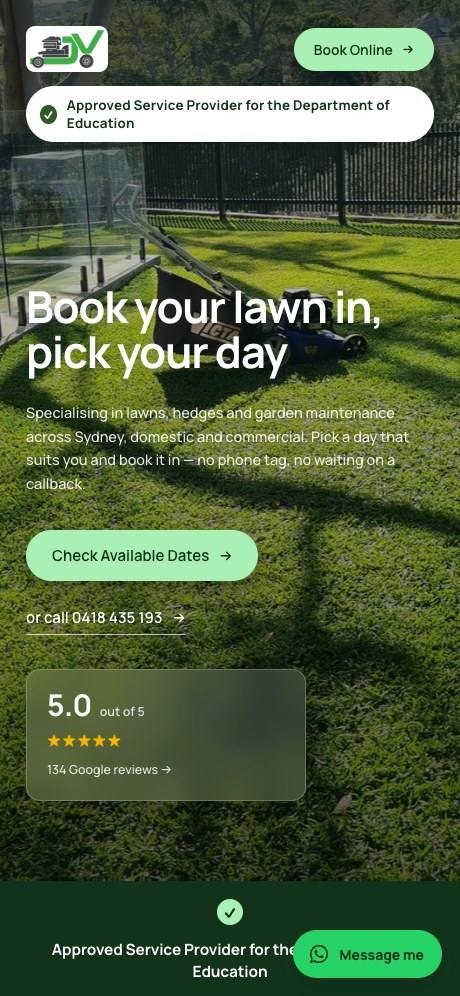
Reviews are one part of showing up locally. For the rest, see our guide to local SEO for tradies, which applies to most local service businesses.
Sources
- Commerce Commission: Commission prosecutes The TV Shop over customer reviews (2023)
- Google Business Profile Help: Tips to get more reviews
- Google Maps user-contributed content policy: Fake engagement
- Google Business Profile Help: Tips to improve your local ranking on Google
- Commerce Commission: Online reviews