How to build an Airbnb cleaning schedule, and a free app that does it
An Airbnb cleaning schedule is a list of every turnover: each checkout, the next check-in, and who is cleaning in between. The reliable way to build one is from your booking calendar, automatically, so a booking made at midnight still produces a clean. HostMaster does that. It is a free tool for short-term rental hosts that brings bookings into one calendar and generates cleaning schedules automatically. Here is how to build a schedule by hand, and how the app does it for you.
- A cleaning schedule for a short-term rental is driven by checkouts: every checkout needs a clean before the next check-in
- Build it from your booking calendar, not by hand, so a new booking cannot be missed
- HostMaster generates the schedule from your bookings and shares it with your cleaners, free
What goes into a cleaning schedule?
One row for every turnover, with enough detail that a cleaner never has to ring you.
| Field | Why it matters |
|---|---|
| Property | Obvious with one listing, essential with several |
| Checkout date and time | When the cleaner can get in |
| Next check-in date and time | The deadline |
| Same-day turnover? | The tight ones need to be seen first |
| Who is cleaning | One name per clean |
| Status | Scheduled, done |
| Notes | Extra beds, a late checkout, something broken |
The schedule is driven by checkouts. No checkout, no clean. A new booking creates a new checkout, and a cancelled one removes it.
Why do hand-made schedules go wrong?
Because bookings change after you write the schedule.
- A guest books for tomorrow, and nobody updates the spreadsheet.
- A guest extends by a night, and the cleaner arrives to an occupied house.
- A cancellation leaves a clean booked that is no longer needed.
- Two people keep two versions.
- The cleaner's copy is a screenshot from last week.
Every one of these is the same failure: the schedule and the calendar have drifted apart. The fix is to stop keeping them separately.
How do you build one by hand?
If you have one property and a regular cleaner, a manual schedule can work.
List checkouts
Open your booking calendar and write down every checkout for the next month.
Add the deadline
Beside each, the next check-in.
Flag same-day turnovers
These are where things go wrong.
Assign and share
Put a name on each clean and send it to the cleaner.
Check daily
New bookings change the list.
Step five is the one that gets skipped. A shared online calendar helps: subscribe your cleaner to your Airbnb calendar using its iCal link, so they at least see bookings as they arrive.
How does an app do it automatically?
It reads the booking calendar and works out the turnovers itself, every time the calendar changes.
In HostMaster:
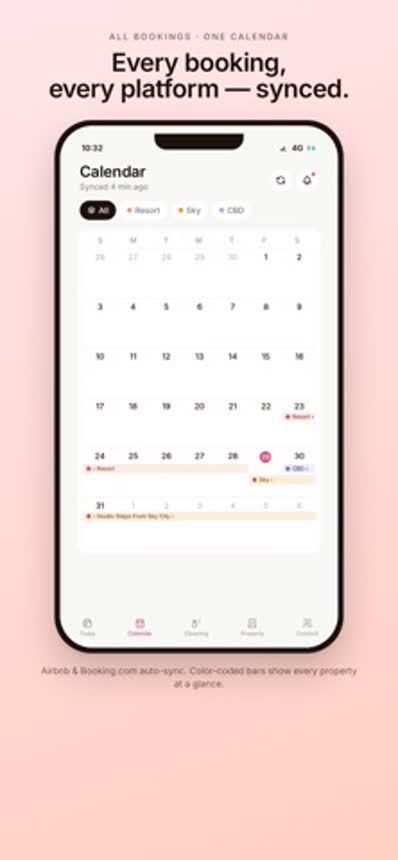
- Connect your calendar. Paste your Airbnb iCal link. Booking.com bookings can be added via Hospitable's iCal link.
- The schedule appears. Cleaning schedules are generated automatically from your bookings.
- Add the people who help you. Co-hosts and cleaners can see the schedule.
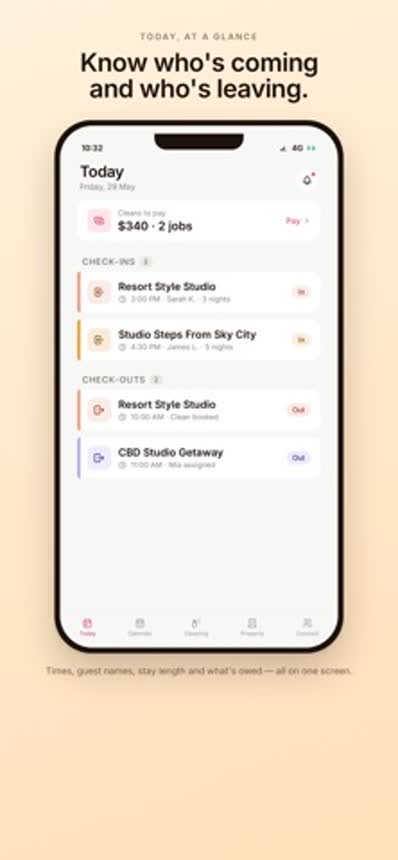
- Open the app in the morning and see what is happening today.
What should you tell your cleaners?
A schedule says when. Cleaners also need to know what.
- How to get in, and how to lock up.
- Where the linen and supplies are kept.
- What "done" looks like, room by room.
- What to restock.
- What to photograph or report: damage, things left behind, anything missing.
- Who to contact, and how, if the guest has not left.
Write it once per property and keep it with the schedule, not in a message thread that scrolls away.
How do you handle same-day turnovers?
They are the highest-risk item on any schedule, so plan them, do not just hope.
- Know them in advance. A schedule that flags same-day turnovers a week out lets you book the cleaner first.
- Leave a real gap between your checkout and check-in times.
- Have a backup cleaner.
- Keep spare linen on site, so the clean does not wait for the laundry.
This is also why the quality of your calendar feed matters. In June 2026, Booking.com changed its iCal feeds so that back-to-back reservations show as one continuous blocked period. A same-day turnover in the middle of that block is invisible to any tool reading the feed. It is the reason HostMaster takes Booking.com bookings through Hospitable's iCal link, which keeps reservations separate. The background is in the free channel manager story.
What does HostMaster not do?
It plans cleaning. It does not manage your listings.
HostMaster reads your calendars and does not write back to Airbnb or any other site. It does not prevent double bookings, it does not set prices, and it does not message guests. If you need those, you need a channel manager, or the platforms' own tools.
Who is it for? Hosts and small managers who mostly need two things: every booking in one place, and a cleaning schedule everyone can trust. It is used by Marrone, a short-term rental management business run by the same founder, to manage its cleaning.
Is HostMaster free?
Yes. HostMaster is free to download on the App Store and Google Play.