How to sync your Airbnb calendar using its iCal link
To sync your Airbnb calendar with another calendar, copy the iCal link from your listing's calendar settings in Airbnb, then paste it into the other calendar as a subscription. Google Calendar, Apple Calendar, Outlook and hosting apps such as HostMaster can all read it. Your Airbnb bookings then appear there and update automatically. The link is one-way and not instant, which matters if you list on more than one site.
- Airbnb gives every listing a private iCal link that other calendars can read
- Paste it into Google Calendar, Apple Calendar or a hosting app to see your bookings there
- Syncing is one-way and not instant, so it helps you see bookings but does not prevent double bookings
What is an Airbnb iCal link?
It is a private web address that leads to a calendar file of your listing's booked and blocked dates. Airbnb keeps the file up to date. Anything that understands the iCal format can subscribe to the address and show those dates.
iCal is an open standard that has been around for decades, which is why it works almost everywhere.
Treat the link like a password. Anyone who has it can see when your property is occupied.
How do you find your Airbnb iCal link?
Open your listing
In Airbnb, go to the calendar for the listing you want.
Find availability settings
Look for the option to connect or sync calendars.
Export
Choose to export the calendar. Airbnb shows a link.
Copy
Copy the whole link.
Airbnb moves these menus from time to time, so if the wording differs, follow Airbnb's own instructions for syncing calendars. Each listing has its own link. If you have three listings, you have three links.
Where can you paste it?
| Destination | What you get |
|---|---|
| Google Calendar | Bookings beside your personal events |
| Apple Calendar | The same, on iPhone and Mac |
| Outlook | The same, for work calendars |
| Another booking site | That site blocks the dates Airbnb has booked |
| A hosting app such as HostMaster | One calendar across listings, plus a cleaning schedule |
In Google Calendar, you add it with the option to subscribe to a calendar from a URL. Other calendar apps have an equivalent "add subscription" or "add from web address" option.
How do you sync Airbnb with another booking site?
By swapping links in both directions. Export the iCal link from Airbnb and import it on the other site. Then export the other site's link and import it into Airbnb. Each site then blocks the dates the other has booked.
Two cautions. Each site refreshes imported calendars on its own schedule, not instantly, so a guest can book on one site before it has heard about a booking on the other. And what each site puts in its feed can change.
That second point is not hypothetical. In June 2026, Booking.com changed how its iCal feeds deliver data: back-to-back reservations now show as one continuous blocked period, not two separate bookings. For blocking dates, that still works. For anything that needs to know where one stay ends and the next begins, such as scheduling a clean, it does not.
Does syncing calendars prevent double bookings?
Not reliably, and it is important to be clear about that.
- iCal is read on a schedule, not in real time.
- There is a window between a booking being made and every other site knowing.
- A feed can fail quietly, and nothing tells you.
- iCal carries dates, not prices or rules.
Calendar syncing reduces the risk a great deal. It does not remove it. HostMaster does not prevent double bookings either. It reads your calendars so you can see and plan. It does not write anything back to Airbnb or any other site. If you need near-instant blocking across several sites, that is what paid channel managers with direct connections are for. We explain the difference in the free channel manager story.
How do you sync your Airbnb calendar with HostMaster?
HostMaster is a free tool for short-term rental hosts that brings bookings into one calendar and generates cleaning schedules automatically.
- Copy the iCal link for your listing from Airbnb, as above.
- Add the property in HostMaster and paste the link.
- Repeat for each listing.
- Add your co-hosts and cleaners, so everyone can see the schedule.
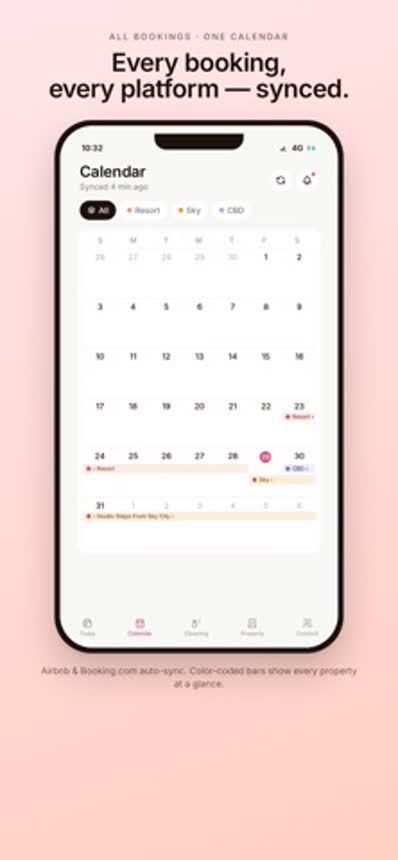
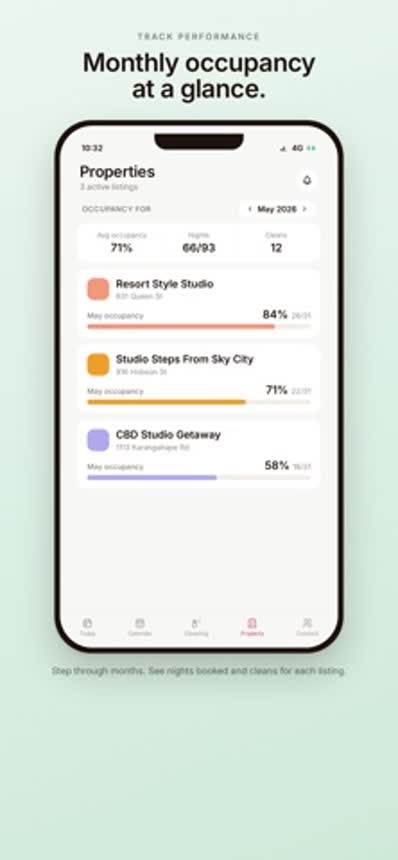
From those bookings, HostMaster generates the cleaning schedule. See how to build an Airbnb cleaning schedule.
What about Booking.com bookings?
Because of the change described above, HostMaster no longer takes a direct Booking.com iCal link. Merged back-to-back bookings would hide turnovers, and a cleaning schedule that misses cleans is not safe to rely on.
Booking.com bookings can still be added by connecting Booking.com to Hospitable and pasting Hospitable's iCal link into HostMaster. Hospitable is a separate service with its own plans.
What should you check if the sync stops working?
- Was the whole link copied, with nothing cut off the end?
- Is it the link for the right listing?
- Is the listing still active in Airbnb?
- Has enough time passed? New bookings are not instant.
- Does the booking show in Airbnb's own calendar?
Is HostMaster free?
Yes. HostMaster is free to download on the App Store and Google Play.