How to use auto-tune without sounding like a chipmunk or a robot
Auto-tune makes you sound like a chipmunk when it shifts your pitch without also correcting your formants, the resonances that give your voice its own character. It makes you sound like a robot for a different reason: the pitch is being snapped to each note instantly. To avoid both, set the correct key, slow the correction down, sing close to the note in the first place, and use a tool that preserves formants. Singium does that with its anti-chipmunk voice control.
- The chipmunk sound comes from shifting pitch without correcting the voice's formants, the resonances that make it sound like you
- The robot sound is separate: it comes from snapping to each note instantly
- Set the right key, slow the retune, and use an app that preserves your voice, such as Singium
Why does auto-tune make you sound like a chipmunk?
Your voice has two layers. The pitch is the note you are singing. The formants are the resonances of your throat and mouth, and they are what make you sound like you, and not like someone else singing the same note.
The simplest way to raise a pitch is to speed the sound up, the way a record played too fast goes high and squeaky. That raises the formants along with the pitch. A voice with raised formants sounds like it is coming from a much smaller body. That is the chipmunk.
Pitch
- The note itself
- What auto-tune is meant to change
- Higher or lower on the scale
Formants
- The shape of your voice
- What should stay the same
- Shift them and you sound like someone else
The fix is to move the pitch and leave the formants where they were. That is called formant correction, or formant preservation.
Why does auto-tune make you sound like a robot?
Because of speed, not formants.
A human voice slides between notes and wobbles slightly on each one. If auto-tune corrects instantly, those slides vanish and the voice steps from note to note like a keyboard. That stepped sound is the famous effect, and plenty of artists use it on purpose.
The control for this is usually called retune speed. Fast gives you the robot. Slow lets the natural movement through and simply nudges you towards the right note.
Which problem do you have?
| What you hear | Cause | Fix |
|---|---|---|
| Thin, squeaky, like a cartoon | Formants shifted with the pitch | Turn on formant correction, or shift less |
| Stepped, like a keyboard | Retune speed too fast | Slow the retune |
| Warbling between two notes | Wrong key, or you are between notes | Set the correct key and scale |
| Sudden jumps to odd notes | Scale includes notes the song does not use | Choose the right scale |
| Metallic or watery | The tool is working too hard | Sing closer to pitch |
Most "bad auto-tune" is the third row. If the app thinks the song is in a different key from the one you are singing in, it will drag you to wrong notes with great confidence.
How do you get natural-sounding auto-tune?
- Set the right key and scale. This matters more than every other setting combined.
- Slow the retune speed until the steps disappear.
- Keep formant correction on.
- Sing as close to the note as you can. Auto-tune is best at small corrections. The further it has to move you, the more you will hear it.
- Do not shift further than you need to.
- Listen back on headphones, not the phone's speaker.
Key
Match the app to the song.
Speed
Slow, for natural. Fast, for the effect.
Formants
Preserved, so it still sounds like you.
Sing well
Small corrections are invisible ones.
What does Singium do about the chipmunk effect?
Singium is an auto-tune singing app and full music studio in your pocket. One of its features is anti-chipmunk voice control: shift your pitch without sounding like a cartoon. Singium keeps the natural character of your voice, so it still sounds like you.
You can hear the effect live as you sing, which makes it much easier to set. You change a control and hear the result on the next note, not after an export.
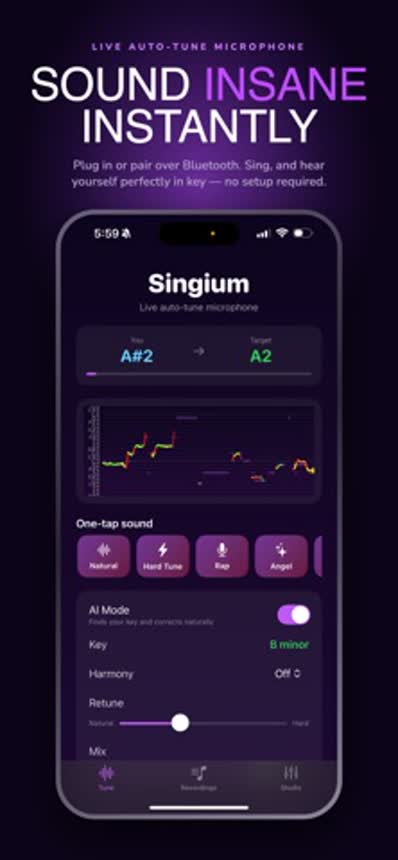
Singium also finds your key automatically, which removes the most common cause of bad tuning, and lets you choose how hard the correction is, from natural tuning to the hard snap.
Can you do the robot effect on purpose?
Yes, and it is a legitimate sound. Set the retune to its fastest and hardest, pick the key, and sing with clear, separate notes. Slides between notes are what the effect chops into steps, so the more you slide, the more dramatic it gets.
You can combine the two ideas: a hard, stepped pitch with your natural formants intact sounds like you through an effect, not like a cartoon.
Does the microphone matter?
Less than the settings, but it helps to give the app a clean signal.
- Sing close to the phone, in a quiet room.
- Keep backing music out of the microphone. Use headphones.
- Avoid rooms with a lot of echo.
- Do not shout. Distortion confuses pitch detection.
- Use wired headphones for monitoring. Bluetooth adds a little lag.
Our guide to live auto-tune apps covers the speaker and headphone setup, and how to sing with auto-tune covers technique.
Is Singium free?
Yes. Singium is free to download on the App Store and Google Play. Premium is a monthly subscription that removes ads, including the short ad shown when an export finishes.